Smart Trainers
Wahoo KICKR Core 2 Review: A Familiar Trainer With Smarter Electronics
The KICKR Core 2 keeps the dependable platform riders have trusted for years and adds Wi-Fi, race mode, a sensor hub, and new flat legs. Here is what works, what does not, and who it suits.
Introduction
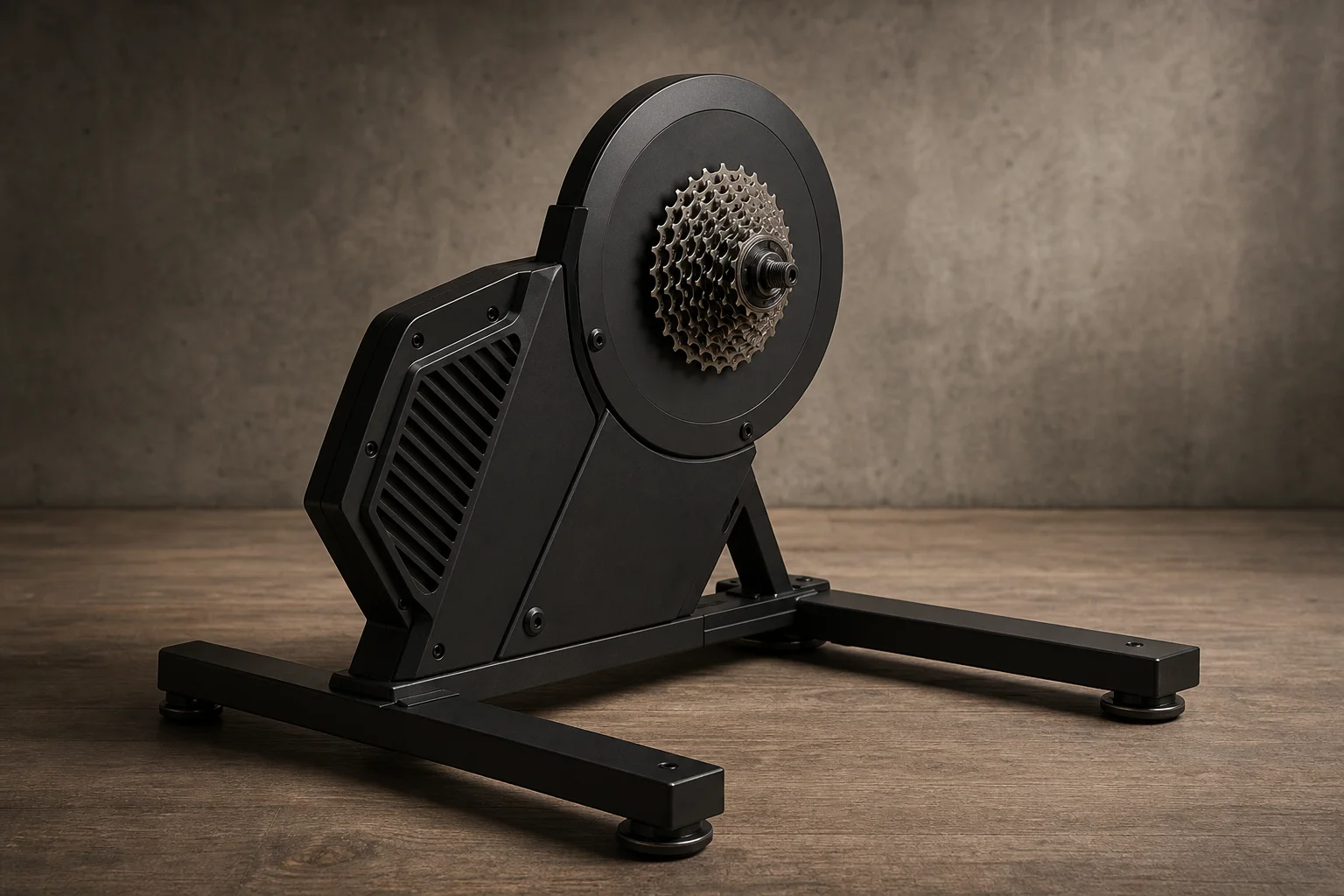
The Wahoo KICKR Core 2 is an interesting product because it barely changes what made the original KICKR Core popular. The platform underneath is essentially the same as the KICKR Core 1, which launched back in 2018: same 16% max incline simulation, same max wattage, same flywheel. What Wahoo has done instead is refresh the electronics compartment and a handful of features around the riding experience. After putting significant mileage on two units, including rides from a second rider, the overall picture is of a dependable mid-range smart trainer with a few genuinely useful additions and one feature that remains frustratingly inconsistent.
Who This Product Is For
The KICKR Core 2 suits indoor riders who want a proven, quiet, accurate direct-drive trainer without paying flagship prices. It is particularly compelling if you ride mainly in Zwift and are happy with virtual shifting, since the Zwift Cog version works across bikes with different cassette speeds. Riders who spend most of their time in other training apps, or who want real shifting with real gears, should lean toward the cassette edition instead. If you already own a KICKR Core 1 and are happy with it, the case for upgrading is thinner: the core riding feel is identical, and the new features are about connectivity rather than the ride itself.

What Is New in the KICKR Core 2
The headline addition is Wi-Fi. The main practical benefit is sidestepping Bluetooth or ANT+ connectivity problems, whether that is interference from a microwave, neighbors, or simply a crowded signal environment. Wi-Fi also handles firmware updates automatically in the background, checking every 11 hours so the download does not interrupt your regular 6 a.m. ride slot.
Wi-Fi also unlocks race mode, which updates power numbers 10 times per second instead of the traditional once per second. In practice, your avatar reacts faster to a sprint, which matters mostly for sprint attacks rather than steady riding. If you use Zwift and the Zwift protocol, race mode can work over Bluetooth, so Wi-Fi is not strictly required there.
The third addition is the KICKR Bridge, also called the sensor hub. It lets you pair accessories such as a heart rate strap or Zwift Clicks to the trainer, which then presents them to your app as one cohesive connection. That is especially valuable on Apple TV, which limits you to two Bluetooth connections plus the remote; without a bridge, a trainer plus a heart rate strap would leave no room for the Zwift Clicks. Wahoo is catching up here, as JetBlack and Elite have offered similar features for a couple of years.

The KICKR Bridge is also the weak point. Across two different units and two different heart rate strap vendors, including a Garmin HRM600 and a Polar strap, the connections repeatedly failed: connections that would not establish, static values, values that stopped updating mid-ride, or updates arriving only every few minutes. Wahoo says it is working for them and is continuing to investigate, but in real-world testing this feature was not dependable. The concept is good and the implementation may settle over time, but buyers should not count on it today.
The legs are also new. They are now flat rather than rounded, matching the design language of the Zwift Ride bike. It is a cosmetic and compatibility detail rather than a performance change, but it is one of the few visible differences from the original.
Status LEDs That Actually Help
One new feature that simply works is the pair of status LEDs. The upper LED covers connectivity: flashing blue means Bluetooth, flashing white means Wi-Fi, and flashing red means ANT+. The lower LED covers trainer state: yellow while booting, green when ready, white when the flywheel is spinning, and orange when Zwift is connected. Red on the bottom LED signals a fault. There are more combinations documented in the app, but the day-to-day decoding is genuinely straightforward, and it removes a lot of the guesswork about what the trainer is doing.

Setup and Everyday Riding
Setup involves attaching two legs with four bolts, fitting the included hardware for either a thru axle or quick release skewer, and plugging in. On the Zwift Cog version, you remove your rear wheel and mount the bike directly on the cog, then attach Zwift Clicks to your handlebars. They can be mounted inside, outside, or on top of drop bars, on aero bars for TT bikes, or on flat bars. From there, the Wahoo app handles Wi-Fi configuration in a couple of seconds, and pairing to Zwift, Rouvy, TrainerRoad, and TrainingPeaks Virtual all worked fine over both Wi-Fi and Bluetooth.
One small but genuinely annoying hardware gripe: the drive-side cap is not locked in place. The non-drive side twists and locks, but the drive-side cap falls off whenever you tilt or move the trainer, usually to somewhere difficult to retrieve it from. It is a trivial thing that feels cheap on an otherwise solid product.
In use, the trainer automatically replicates on-screen gradients, so a 10% incline feels like 10%, assuming your app’s trainer difficulty setting is at 100%. Zwift defaults that setting to 50%, which halves the perceived gradient; if you bought a trainer to feel the outdoors, dragging it to 100% to use the full 16% is worth considering. Inertia and the acceleration-deceleration feel are identical to the original KICKR Core, which riders have been happy with for roughly seven years. In a blind test against a trainer with a heavier flywheel, most riders likely could not tell the difference.
Noise is minimal, and almost all of it comes from the chain interacting with the Zwift Cog or your cassette rather than from the trainer itself. A cleaner chain means a quieter ride.
Choosing between the two versions is straightforward. If you only use Zwift, especially with multiple bikes of different cassette speeds (for example, a 13-speed gravel bike alongside 12-speed road and tri bikes), the Zwift Cog with virtual shifting makes a lot of sense because the same setup works across all of them. If you use other apps like Rouvy or TrainingPeaks Virtual, which do not officially support Zwift’s virtual shifting hardware, get the cassette edition so you can shift with your real handlebars. Note that the cassette edition currently ships with an 11-speed cassette, so moving to 12-speed requires a cassette tool and a new cassette, typically in the $50 to $70 range.

Accuracy and Long-Term Value
Accuracy testing across structured 30x30 and 3-minute interval workouts, simulation-mode rides, and sprints around 900 watts showed consistently spot-on results when compared against Garmin Rally RS200-series power meter pedals and a Quarq power meter on the same bikes. Response to interval set points hit target in about two seconds, which is effectively ideal, and cadence readings were clean. The same results held across both test units, with no difference between them.
On price, the KICKR Core 2 is officially $549, but it has already been seen down to $430 within its first two months on sale. The realistic going rate is likely to hover in the $400 to $500 range most of the time, so it is worth watching for sales rather than paying full price.
There are solid competitors in the same bracket, including the JetBlack Victory, the newer Elite model, and the Magene unit, all at similar or slightly lower price points. All of them performed well in comparable testing, so the KICKR Core 2’s edge is its track record: the underlying design has been dependable for years, and that reliability is the strongest reason to buy it. The main caveat is the sensor bridging feature, which needs more time to mature.
Buying Advice
If you are setting up a first serious indoor riding station and mostly ride Zwift, buy the Zwift Cog version with Zwift Clicks, configure Wi-Fi during setup, and set trainer difficulty to 100% for the most realistic gradient feel. If your training lives in TrainerRoad, Rouvy, or TrainingPeaks Virtual, buy the cassette edition and plan for a possible cassette swap. Skip relying on the KICKR Bridge for heart rate for now, and pair your strap directly to your app until the feature proves itself.
Conclusion
The Wahoo KICKR Core 2 is a cautious refresh of a trainer that did not need fixing. The riding experience, accuracy, and noise levels are all strong and consistent with a platform riders have trusted since 2018, and Wi-Fi, race mode, and clearer status LEDs are genuinely useful additions. The sensor hub is a promising idea that currently falls short in real use, and the loose drive-side cap is a small irritation. At a realistic street price in the $400 to $500 range, it remains one of the easiest mid-range smart trainers to recommend.
Product link
View more details for Wahoo KICKR Core 2
This product is mentioned in the review. Check the specifications, options, and compatibility before buying.
View more details for Wahoo KICKR Core 2Further reading
Related Reviews
Smart Trainers
Pinnacle HC Review: An Affordable Direct Drive Smart Trainer
A close look at the Pinnacle HC, a £500 direct drive smart trainer with a 2,200W ceiling, a 5.7kg flywheel, and a quiet, stable ride feel for indoor training.
Smart Trainers
Wahoo Kickr Core vs Zwift Hub: Which Budget Direct Drive Smart Trainer Should You Buy?
A practical head to head between the Wahoo Kickr Core and the Zwift Hub, covering price, flywheel weight, setup, noise, connectivity, and power accuracy.
Smart Trainers
Elite Avante Review: A Smart Trainer That Punches Above Its Hardware
The Elite Avante pairs mid-range trainer hardware with high-end software features like built-in Wi-Fi and heart rate bridging. Here is how it holds up after months of riding.